
I love learning (human) languages. Hindi and Urdu are home, English is everyday, my German is a respectable A2, I can read and write basic Persian… and my Danish is still stuck at “rødgrød med fløde” (edit 2026: i can now kinda have conversations in Danish uwu). Which is embarrassing, because I live in Denmark now.
The problem isn’t motivation, it’s time. Flashcards and apps want me to stop what I’m doing and study, and I spend most of my day reading stuff on the internet anyway. So I thought: what if the internet just… slowly turned a bit Danish?
And it’s not just me. A lot of people who move to a new country end up living around a language: you hear it at the supermarket, you get letters in it, and you still never find the hour a day that language apps assume you have. Most learning tools treat a language as a separate activity you have to make room for. I was curious what would happen if the learning went to where your attention already is, and you stayed in charge of how much of it you got.
That’s बोलLang (BoLang). Bol (बोल) means “speak” in Hindi, and Lang is, well, language.
The idea: learn without “learning”
The idea is borrowed from linguist Stephen Krashen’s theory of language acquisition. The short version:
- Acquisition beats learning. We pick up languages subconsciously, the way kids do, rather than by memorising grammar tables.
- Comprehensible input. We acquire a language best when we see lots of it in a context we mostly understand already.
- The affective filter. Stress and boredom get in the way. Low-pressure input sticks better.
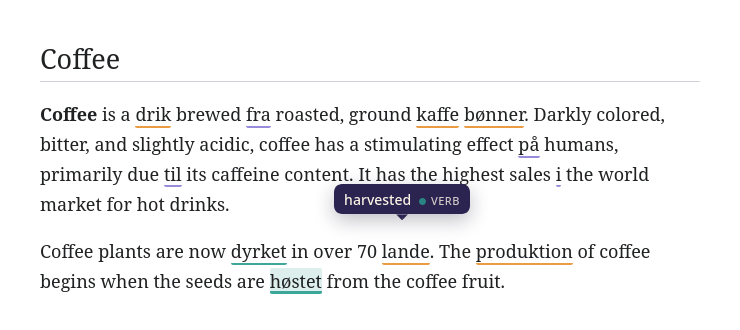
So instead of a quiz, BoLang takes a page you’re already reading and replaces a handful of the most common words with their translations. You still understand the sentence (it’s mostly English), but now kaffe and bønner are sitting right there in context. Read enough pages and they stop being new.
Before building it, I ran a small survey with friends and classmates. Most people said passive, in-context learning sounded more helpful than the tools they already used. Most wanted to control which kinds of words get swapped. And a reassuring number said they’d actually try it.
What it looks like
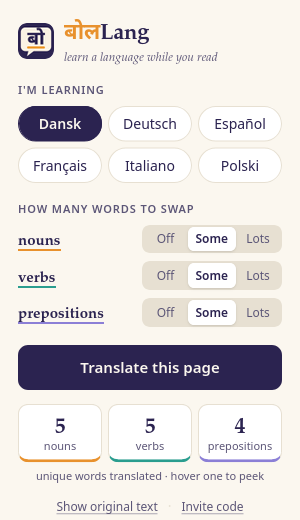
You open any English page, click the BoLang icon, and hit Translate this page. Some words get a thin underline: saffron for nouns, teal for verbs, violet for prepositions. Hover over one and it tells you the original.
The popup lets you choose the language (Danish, German, Spanish, French, Italian or Polish) and how many nouns, verbs and prepositions to swap: Off, Some or Lots. Show original text puts everything back.
How it works (the short version)
BoLang has two halves: the extension in your browser, and a small server.
- When you click Translate, the extension grabs the visible text of the page and sends it to the server, along with your settings.
- The server runs the text through spaCy, a natural-language-processing library, which tags every word as a noun, verb, preposition and so on. It then picks the most frequent ones, because the words you see most are the ones worth learning first.
- Those words get translated with DeepL, and the server sends back a little dictionary like
{"coffee": "kaffe", "from": "fra"}. - The extension walks through the page and wraps each matching word in an underlined span, keeping the original for the hover card.
A tool that sits on top of everything you read has to earn some trust, so here are a few decisions I’m happy with:
- It only runs when you click. No reading every page you visit in the background.
- It sends text, never the URL. The first version sent the page address and had the server download the page itself. That broke on any page behind a login, and it meant the server would fetch any URL anyone gave it, which is a classic security hole called SSRF. Now the server never downloads anything and never learns which site you’re on.
- Only single words go to DeepL, never the page text.
- Cache + rate limits. Translations are cached so common words like “in” and “the” are only translated once, which matters when you’re living on DeepL’s free 500,000 characters a month.
The server is a small Flask app running on Render’s free plan. The catch with free hosting is that it falls asleep after 15 minutes without visitors, so the first click of the day can take up to a minute while it wakes up. Patience is part of language learning, right?
It’s not perfect (it’s quite funny, actually)
Translating words one at a time, with no context, produces some gems:
- “drinks” → drikkevarer, which means “beverages”, not “she drinks”
- “runs” → séries in French, as in a series of games
- “sat” → Sa, which is short for Saturday
Context-aware translation is at the top of my list for the next version.
Want to try it?
BoLang is Firefox only for now, and it’s a hobby project for me and my friends, so it isn’t listed in the Firefox add-on store. It is reviewed and signed by Mozilla, though, so it installs like any other add-on.
- Download BoLang for Firefox, then click Add when Firefox asks. (Or drag the file onto a Firefox window.)
- Email me for an invite code at aakanksha.d.mail [at] gmail [dot] com The server runs on a free translation budget shared by everyone(my 2 friends and I), so I hand out codes to keep it from running dry.
- Click the BoLang icon → Invite code → paste it → open any English page → Translate this page.
Curious what happens to your data? Here’s the privacy policy. The short version is: no accounts, no tracking, and page text isn’t stored. The code is all on GitHub.
What’s next
- Smarter translations that take the sentence into account, so drinks stays a verb
- Remembering what you’ve learned, and swapping in words you haven’t seen yet
- Maybe a little quiz or streak, since most people in the survey said that would keep them coming back
- Bring your own DeepL key, so it could go public without me rationing invite codes
If you try it, tell me what you think. And if you know any Danish words better than rødgrød med fløde, I’m all ears.